
# 1 Authentication
# 1 Authentication
# 1.1 Get access token(POST)
Token-based authentication, the life of an access token is 15 days, and the life of a refresh token is 180 days. You can request new access tokens with refresh token when access token expires. You need to log in when refresh token expires.
Rate limit is consistent with other API endpoints: maximum 1 call per second (QPS = 1).
Token Caching: When the same account calls the Get Token endpoint multiple times within 24 hours, the returned accessToken and refreshToken remain consistent (server-side cache). The Refresh Token endpoint also returns the same cached token within the 24-hour window. After 24 hours or after an explicit logout, a new token will be generated.
# URL
https://developers.cjdropshipping.com/api2.0/v1/authentication/getAccessToken
# CURL
curl --location --request POST 'https://developers.cjdropshipping.com/api2.0/v1/authentication/getAccessToken' \
                --header 'Content-Type: application/json' \
                --data-raw '{
                    "apiKey": "CJUserNum@api@xxxxxxxxxxxxxxxxxxxxxxxxxxxxxxxxxx"
                }'
| Parameter | Definition | Type | Required | Length | Note |
|---|---|---|---|---|---|
| apiKey | CJ API Key | string | Y | 200 | Get API Key (opens new window) |
Use
apiKeyas the recommended request parameter. Legacy integrations are still compatible withemail + passwordor older password-style credentials, but new integrations should useapiKeyonly.
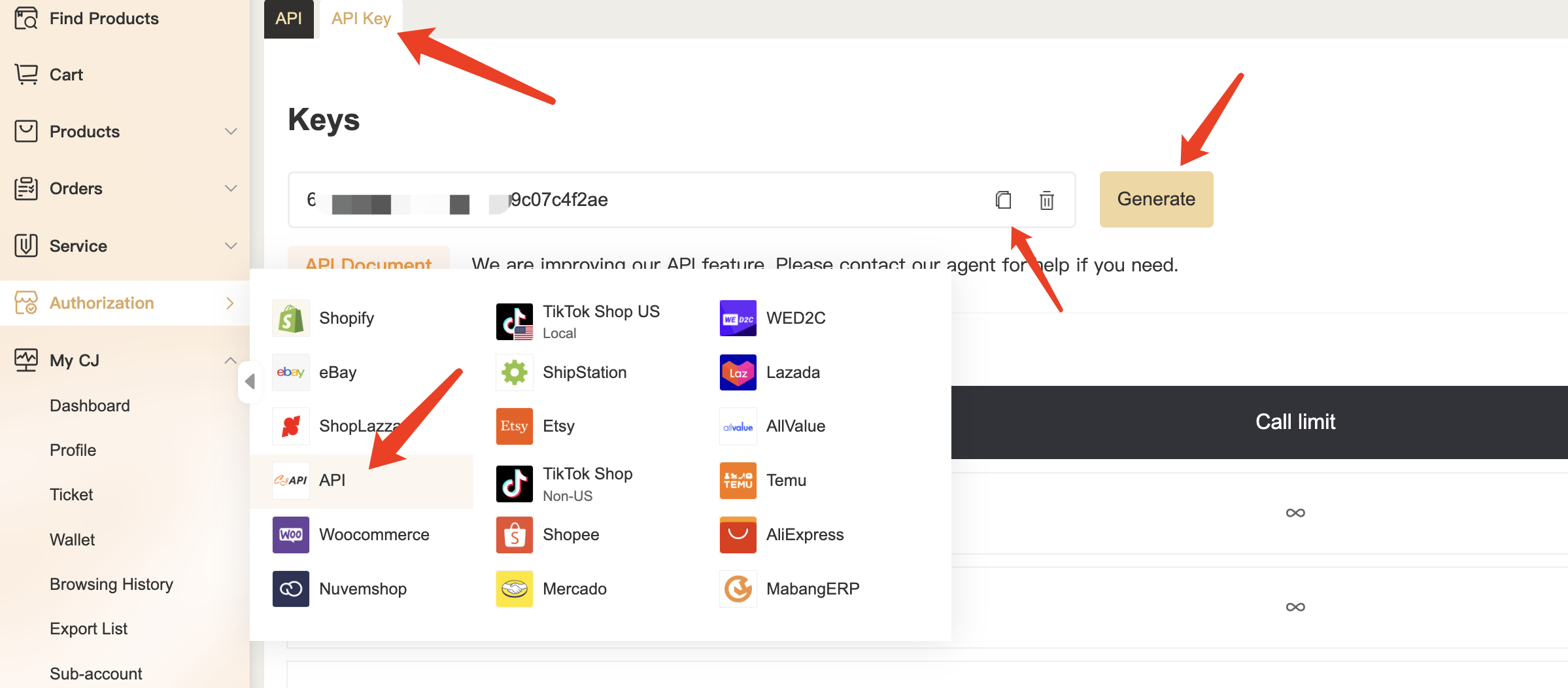
How to get Api Key:
Go to Get API Key (opens new window) and click button "Generate"
# Return
success
{
    "code": 200,
    "result": true,
    "message": "Success",
    "data": {
        "openId": 123456789,
        "accessToken": "f59ac98193d64d62a9e887abea830369",
        "accessTokenExpiryDate": "2021-08-18T09:16:33+08:00",
        "refreshToken": "f7edabe65c3b4a198b50ca8f969e36eb",
        "refreshTokenExpiryDate": "2022-02-07T09:16:33+08:00",
        "createDate": "2021-08-11T09:16:33+08:00"
    },
    "requestId": "8b3d9ea1-00c3-4d10-9e2b-d18041d98080",
    "success": true
}
| Field | Definition | Type | Length | Note |
|---|---|---|---|---|
| openId | Open Id | Long | 20 | |
| accessToken | access token | string | 200 | |
| accessTokenExpiryDate | access token expiry time | string | 200 | Default 15 days |
| refreshToken | Refresh Token | string | 200 | |
| refreshTokenExpiryDate | Refresh Token expiry time | string | 200 | Default 180 days |
| createDate | Created date | string | 200 |
error
{
    "code": 1601000,
    "result": false,
    "message": "User not find",
    "data": null,
    "requestId": "a18c9793-7c99-42f9-970b-790eecdceba2",
    "success": false
}
| Field | Definition | Type | Length | Note |
|---|---|---|---|---|
| code | Error code | int | 20 | Return to error codes |
| result | Whether returned | boolean | 1 | |
| message | Return message | string | 200 | |
| data | Data return | |||
| requestId | Request ID | string | 48 | For error inquiry |
# 1.2 Refresh access token(POST)
An API security mechanism with which the expiry date of access token can be refreshed. The life of an access token is 15 days.
# URL
https://developers.cjdropshipping.com/api2.0/v1/authentication/refreshAccessToken
# CURL
curl --location --request POST 'https://developers.cjdropshipping.com/api2.0/v1/authentication/refreshAccessToken' \
                --header 'Content-Type: application/json' \
                --data-raw '{
                    "refreshToken": "3d3b01404da04be8b6795d7e9823cee5"
                }'
| Parameter | Definition | Type | Required | Length | Note |
|---|---|---|---|---|---|
| refreshToken | Refresh Token | string | Y | 80 |
# Return
success
{
    "code": 200,
    "result": true,
    "message": "Success",
    "data": {
        "accessToken": "f59ac98193d64d62a9e887abea830369",
        "accessTokenExpiryDate": "2021-08-18T09:16:33+08:00",
        "refreshToken": "f7edabe65c3b4a198b50ca8f969e36eb",
        "refreshTokenExpiryDate": "2022-02-07T09:16:33+08:00",
        "createDate": "2021-08-11T09:16:33+08:00"
    },
    "requestId": "8b3d9ea1-00c3-4d10-9e2b-d18041d98080",
    "success": true
}
| Field | Definition | Type | Length | Note |
|---|---|---|---|---|
| accessToken | access token | string | 200 | |
| accessTokenExpiryDate | access token Expiry Time | string | 200 | Default 15 days |
| refreshToken | Refresh Token | string | 200 | |
| refreshTokenExpiryDate | Refresh Token Expiry Time | string | 200 | Default 180 days |
| createDate | Created Date | string | 200 |
error
{
    "code": 1600003,
    "result": false,
    "message": "Refresh token is failure",
    "data": null,
    "requestId": "0b20dc1a-0043-43a7-a7c0-51ca6c61d976",
    "success": false
}
| Field | Definition | Type | Length | Note |
|---|---|---|---|---|
| code | error code | int | 20 | Reference error code |
| result | Whether or not the return is normal | boolean | 1 | |
| message | return message | string | 200 | |
| data | return data | object | interface data return | |
| requestId | requestId | string | 48 | Flag request for logging errors |
# 1.3 Logout Token(POST)
API security mechanism. After logging out, access token and refresh token will expire.
# URL
https://developers.cjdropshipping.com/api2.0/v1/authentication/logout
# CURL
curl --location --request POST 'https://developers.cjdropshipping.com/api2.0/v1/authentication/logout' \
                --header 'CJ-Access-Token: xxxxxxxxxxxxxxxxxxxxxxxxxxxxxxxxxx'
# Return
success
{
    "code": 200,
    "result": true,
    "message": "Success",
    "data": true,
    "requestId": "b1d3728d-8a29-417e-9983-6df9926aaa49",
    "success": true
}
| Field | Definition | Type | Length | Note |
|---|---|---|---|---|
| code | error code | int | 20 | Reference error code |
| result | Whether or not the return is normal | boolean | 1 | |
| message | return message | string | 200 | |
| data | return data | object | interface data return | |
| requestId | requestId | string | 48 | Flag request for logging errors |
error
{
    "code": 1600001,
    "result": false,
    "message": "Authentication failed",
    "data": null,
    "requestId": "5aa2bb6e-42fa-4e0a-ae88-1833c2c1c883",
    "success": false
}
| Field | Definition | Type | Length | Note |
|---|---|---|---|---|
| code | error code | int | 20 | Reference error code |
| result | Whether or not the return is normal | boolean | 1 | |
| message | return message | string | 200 | |
| data | return data | object | interface data return | |
| requestId | requestId | string | 48 | Flag request for logging errors |